Wednesday, February 22, 2012

Surveillance Software : CamPro Professional


Today, the safety issue about persons, goods and even the information has become a topic of global reach. Among possible solutions, video surveillance is one of the oldest security technologies and widespread.
In order to position itself as a comprehensive provider in the competitive market of video surveillance, AirLive trademark belonging to Ovislink Corp. of Taiwan, maker of networking equipment, communication and IP surveillance, announces CamPro Professional, intelligent software designed to meet the demands professional applications
n addition to the AirLive IP Cameras, CamPro Professional also supports more than 25 IP camera manufacturers.  In installations where there is a hybrid model of the monitoring system, the software CamPro Professional allows you to easily integrate IP cameras. Even systems based on CCTV cameras can be easily adapted by using the VS-100. AirLive CamPro Professional is especially useful in scenarios exposed to vandalism. The detection function blocks (tampering detection) alarm when someone tries to manipulate the camera. For example, if an intruder tries to move the IP camera to another place, CamPro Professional recognize the attack and send an alarm on ascreen or other device.
With this feature, security personnel can detect disruption of the functioning of the IPcameras when someone blocked or manipulated.
The included CMS software can support CamPro Professional server and NVR. Add scalability to existing NVR also provides advanced features such as viewing multiple monitors, monitoring E-Map and intelligent video analytics. Support up to 256 channels including 16 NVRs or CamPro Professional software or mixed. It also supports remote playback function to access video files stored on remote NVR. CMS supporting CamPro Professional and NVR is the ideal solution for monitoring major projects.

CamPro Professional has useful intelligent functions to detect and alert against loss of objects, foreign objects or potentially dangerous and even to define and protect imaginary lines (Trip Wires) a particular area and to establish one or two senses of direction.
Other features are counting objects, face detection and image enhancement.
CamPro Professional can view videos from other computers on local network or over the Internet and supports up to 9 guests simultaneously.


Friday, February 10, 2012

AirLive IPCam Plug and Play with AirLive Routers


More and more users would like to install IP camera in their home or small office. When they go outsides, they can monitor their house, little babies or old parents. The frequently asked question is how to view it and how to set up IP camera or Network device. AirLive provides P&P Wireless Routers to solve your problems. Please see the following video


Thursday, February 9, 2012

AirLive awards Comguard the Distribution in Middle East


Below is a press release in ArabianBusiness.com
Description: AirLive, one of the advanced wireless network and IP surveillance company recently partnered with " Comguard Wireless".
Comments: In order to serve the growing demands for high quality-professional, innovative, and style-design wireless network and IP surveillance solutions to clients in MENA, Airlive, one of the advanced wireless network and IP surveillance company recently partnered with "Comguard Wireless".

Airlive expertise in Innovations and Technology of advanced Networking & Surveillance as well as RD ties-up and with Comguard's existing well establishe channel in Middle East, together AirLive and ComGuard stay at the win-win stand providing clients competitive and high quality-professional wireless outdoor and IP surveillance solutions and products to ensure their market growth.

Comguard Wireless is a value-added distributor(VAD) with a targeted focus on wireless and video surveillance systems. We assure the industrial IT is our mission to provide VARs and Integrators the solutions they need to successfully deploy the best wireless systems available for their customers while provided the greatest value.

The benefit for Comguard's partnership with AirLive also can established closer business relationship with their enterprise customers, SI, and even ISP, to offer one stop shopping for their clients.

AirLive is glad to build business relationship with Comguard to introduce AirLive advanced wireless outdoor and IP Surveillance innovations and technology through Comguard well established channels in Middle East market.

Thursday, January 5, 2012

How to view IP camera via Internet


IP camera is a digital camera and based on internet. Of course, we can view it on the internet. We take the following network topology as an example.

WN-350R connects to Internet and gets two IP addresses, LAN IP and WAN IP.
On the LAN, each device will get one IP address from WN-350R so IP camera, OD-325HD, gets an IP address, 192.168.0.99 and your PC on the LAN gets an IP address, 192.168.0.100
If you would like to view IP camera on your PC on the LAN, just open browser and then, type “192.168.0.99.”
You will see Web User Interface to ask to enter account and password.


Default value in AirLive IP camera
Account: admin
Password: airlive
After enter a correct account and password, you can do the live view on your PC.

If you would like to view IP camera on the WAN, we need to set up WN-350R.
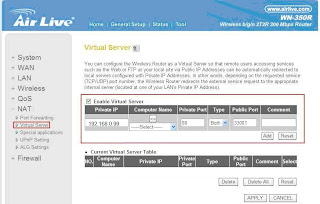
Enter WN-350R Web UI to select “Virtual Server” function.
Setting Local IP Camera (Private IP: 192.168.0.99) private port: 80 to Public
port: 33001.
Don’t forget to click APPLY button to save the configuration.
Now you can just type http://59.115.99.27:33001 on your browser and enter your account and password to do the live view no matter where you are.

More Live Demo in AirLive http://www.airlive.com/demo/camera.php

Tuesday, January 3, 2012

How to make wireless connection in a far distance

  1. Please prepare GPS, compass, Hi-Power Binocular and Walkie talkie 
  2. Set up One Wireless Outdoor CPE as AP mode and the other Wireless Outdoor CPE as client mode. 
  3. Use Google Earth to mark a line between two APs. It can be helpful to adjust the direction and alignment. 


  4. Print the MAP and take the MAP to the point . 
  5. Please use the compass to find the north and let the MAP north in direction of north. 
  6. Please adjust CPE to face another point. Choose a landmark to be a goal if you can’t see the goal directly. Please make sure you have a clear line of sight between two APs. At least 60% of First Fresnel Zone must be cleared for acceptable performance. 
  7. 2 people in a group. One does antenna alignment. The other reports the RSSI values until the antenna alignment is perfect. 
  8. Use just enough output power. Excessive output power will create serious interference for everyone and reduce the performance.